You use Claude Code every day. But do you really know it?
I didn’t. Not really. I could describe the surface, but I couldn’t tell you what was actually happening between hitting enter and seeing a diff. The harness was a black box, and that started to bother me. The only way I knew to fix that was to build one.
The result is oli, a single-binary terminal coding agent written in Rust that runs against Ollama by default. It got much larger than I expected. Every “small” subsystem (memory, policy, tool dispatch, provider quirks) turned out to have its own thicket of edge cases. I learned more about coding agents in a few weeks of building one than I had in a year of using them daily.
The hard parts aren’t clever prompts. They’re context management, tool design, policy gates, memory strategies and, if you want to run locally, survival engineering for models that don’t behave like the GPT-5 or Claude 4 families. This post is a tour of those parts, with the failures that taught me each one.
The Big Picture
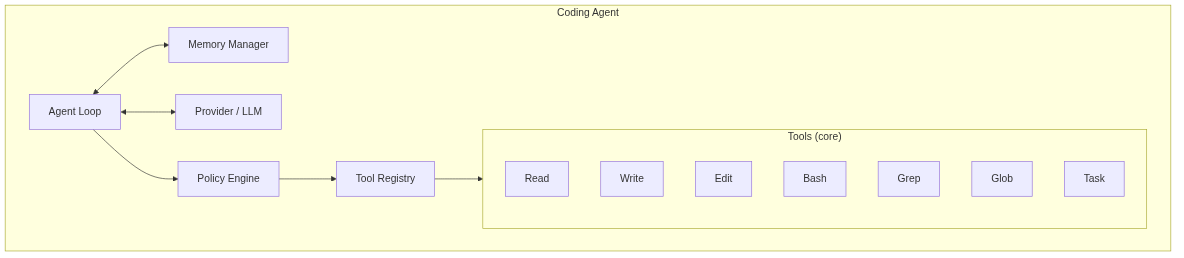
Before diving into components, here’s what a coding agent actually looks like:
The Agent Loop
Every coding agent runs the same basic loop:
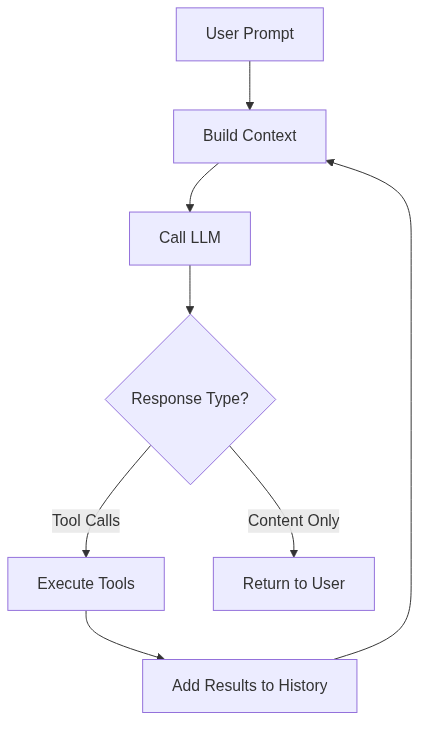
Think → call → observe → repeat. The loop is deceptively simple. Everything hard lives in the details.
Three things I learned the hard way:
Turn limits matter, even on local models. Early on, a local model I was testing got stuck, it looped 47 times trying to “fix” a file that was already correct, burning through my entire context window before I caught it. The model wasn’t broken. The harness was: no turn limit, no escape hatch, no awareness that the model had lost the plot. The instinct is to say “who cares, I’m running locally, tokens are free.” But the cost isn’t dollars, it’s coherence. As context fills, models degrade: attention spreads thinner, instructions in the middle of the window get ignored (“lost in the middle”), and every failed attempt becomes a distractor that biases the next turn toward more wrong behavior. This is especially true on local models, whose effective context is often a fraction of their advertised window — a Qwen3 advertised at 256K may stay coherent only through the first 32-64K. A runaway loop doesn’t just waste compute; it actively makes the agent stupider for the rest of the session. Now subagents get hard turn limits by default, and the top-level agent is capped too, with a config default you can override per run.
The system prompt is pinned. It survives /clear, survives memory compaction, survives everything. The first time I accidentally cleared the system prompt mid-session, the model forgot what tools it had and started apologizing for being unable to help. Pinning was an obvious fix in hindsight.
Re-entrancy is a trap. A Task tool that spawns a subagent which can itself spawn subagents quickly becomes a fork bomb. oli sidesteps the whole problem by registering Task only in the parent agent — subagents get the same tool set minus Task, so they can’t recurse.
The System Prompt
Before you say anything, the model already gets a lot of scaffolding:
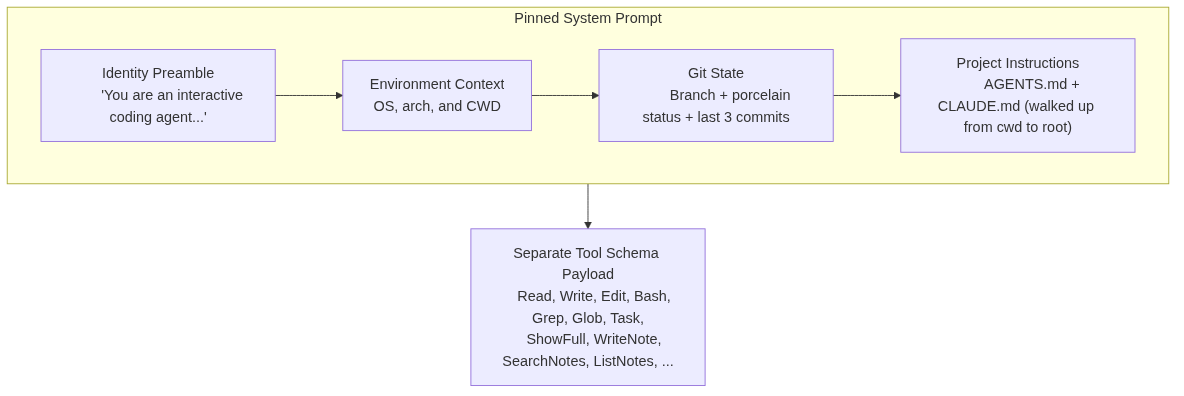
The AGENTS.md + CLAUDE.md line matters. Both Codex and Claude Code established conventions for per-project agent instructions. oli reads both, at every directory level from your current location up to the filesystem root — so a workspace-wide convention can be overridden by a project-level one without copy-pasting.
Note that the system prompt text and the tool schemas are separate payloads in the provider request — a better mental model than “everything lives in one giant prompt.”
The system prompt is expensive. It consumes tokens on every single turn. I learned this when a project with nested AGENTS.md files at multiple levels ate 8,000 tokens before I’d typed anything. Now oli caps injected project context at 16KB total and truncates directory listings at 50 entries. This is also where prompt caching pays off: both the prompt and the tool schema payload are highly stable across turns. Anthropic’s API supports marking that stable prefix as cacheable, and oli supports Anthropic-style cache breakpoints on Claude routes through OpenRouter too. Anthropic prices cached input tokens at roughly 10% of the regular rate, so caching shaves a large chunk off every subsequent turn in a long session.
Tools: The Model’s Hands
The tool surface defines what the agent can do. Too few tools and it’s frustrating. Too many and the model gets confused, especially local models with smaller context windows.

A small core for the work, plus a handful of paging and notes tools. The design principles emerged from failures:
Minimal surface. I started with more, and the model kept picking the wrong tool or stacking calls when one would do. Keeping the core small and bolting on paging and notes tools turned out to be the right shape. Each does one thing. These choices mirror what Claude Code, Cursor’s Composer, and Aider converged on independently — a signal that the design space is narrower than it looks.
Bounded output. Every tool truncates at 30KB. I learned this after the model Read a minified vendor.js file and blew through 180,000 tokens in one call. Now truncation markers embed a cache ID; the model can call ShowFull(id, offset) to paginate the stashed body if it actually needs more.
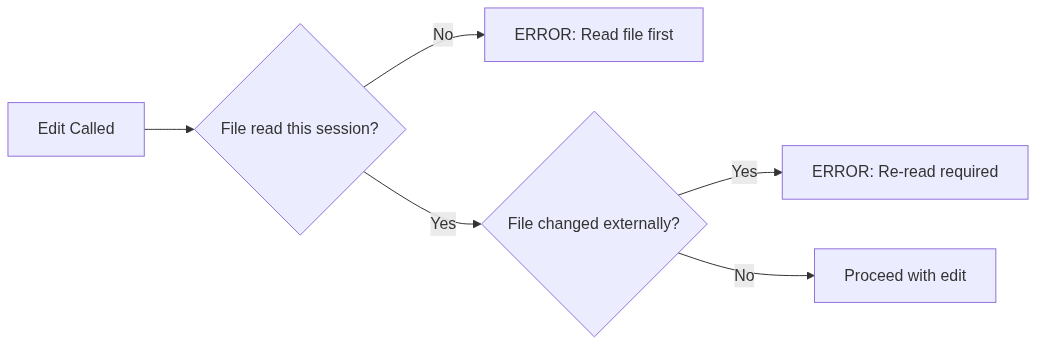
The read-first invariant. Edit refuses to run unless you’ve Read the target file this session. This prevents edits based on stale context — the model can only modify what it’s actually seen this turn:
Tools own their cleanup. When you Ctrl-C a bash command, the harness has to kill not just the shell but every process it spawned. I found this out when orphaned sleep processes from cancelled test runs accumulated over a week. A tool that spawns side effects has to know how to undo them — otherwise they leak into the user’s environment, and the harness gets blamed for the mess.
Memory & Context Management
Context windows are finite. Even 200K tokens fills up fast when you’re reading files, running tests, and iterating. Every tool result eats tokens.

The default strategy is LinearWithCompact: hold messages in order, and when approaching the context limit, summarize older turns into a rolling summary. Compaction triggers at 80% of context window. It finds a cut point at a user-message boundary (never split a tool_call from its result), sends older messages to the LLM with a summarization prompt, and replaces them with a summary message.
That part is straightforward. The bug that ate three days of debugging was cancellation under compaction.
Here’s the scenario. You hit Ctrl-C mid-turn to stop the model. The REPL is supposed to roll back to the last clean state — the user prompt you just sent. Simple, when the message buffer is the source of truth: count back N messages, restore.
Except compaction had already run. The “last 12 messages” the rollback wanted to restore no longer existed — they’d been collapsed into a summary. So Ctrl-C would silently roll the conversation back to somewhere random, often before the work the user was trying to cancel.
The fix was a one-line concept that took a day to see: stop treating the message array as the source of truth for where you are. oli tracks a monotonic record_count that increments on every logical turn, independent of physical message storage. Compaction drains messages, but the record count keeps climbing. Rollback targets a record count, not an array index — so the buffer can shrink underneath without the cursor losing its place.
Generalizable shape: any system that mutates history needs a stable identifier for “where you are” that isn’t the history itself. Memory management is also where coding agents silently fail — the model forgets what file it was editing, or repeats work it already did. The visible bugs are the easy ones.
Policy & Approvals
The policy engine gates every tool call. Without it, you’re one hallucinated rm -rf away from disaster.
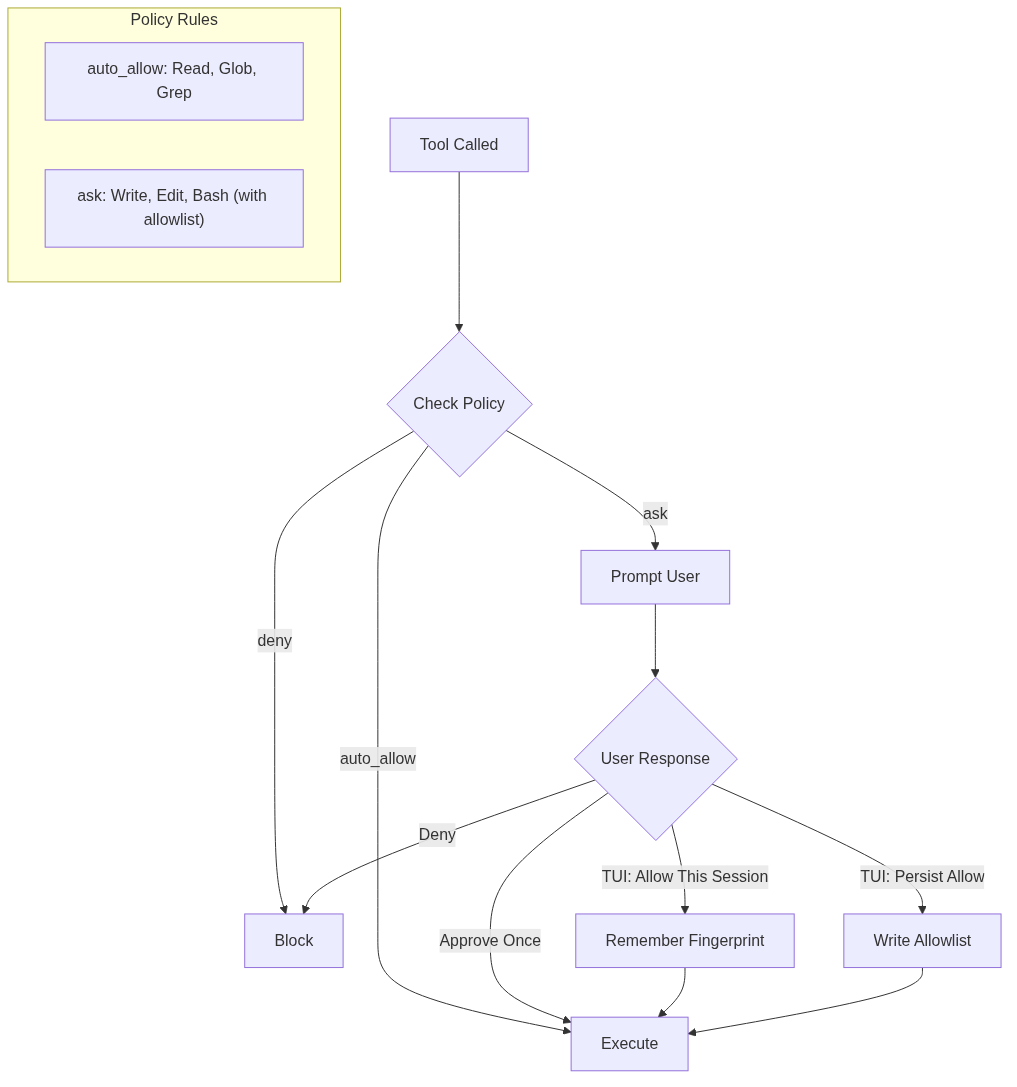
Bash has its own allowlist: git status, cargo test, ls, and similar safe commands auto-approve; everything else prompts. The line-mode REPL is a plain y/N flow; the richer “allow this session” and persisted allowlist behavior are TUI affordances layered on top.
There’s no hard denylist yet, and I’m ambivalent about adding one. Prompt-on-every-mutation is annoying but transparent — you see exactly what the model is about to do. A denylist invites a long tail of “obviously safe” exceptions that gradually erode the gate. Today, blocking happens by denying an Ask decision: slower, but you stay in the loop.
The first time I saw the model attempt rm -rf target/ when I’d asked it to “clean up the build” and the approval prompt caught it, I understood why this layer exists. The model wasn’t malicious. It was being helpful in a way that would have been catastrophic without the gate.
Local-Model Survival
Frontier models handle tool calls cleanly: structured tool_calls arrays in the API response. Local models via Ollama? Not so much.
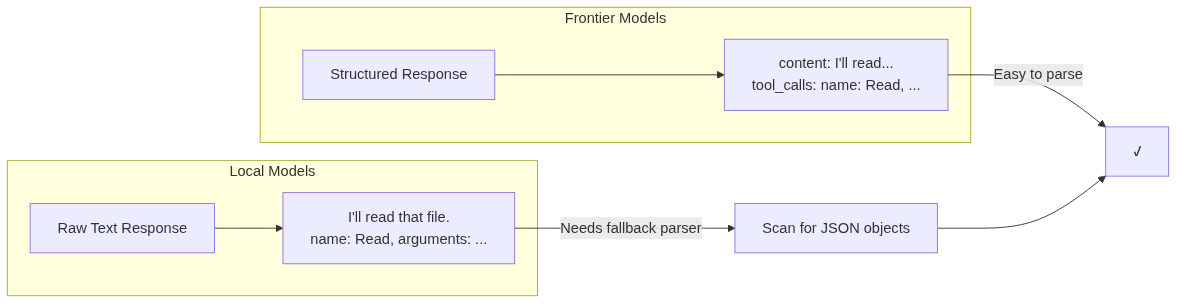
Many local models emit tool calls as plain text. Just raw JSON in the middle of their response. No structured field.
oli solves this with a fallback parser. When the model’s capability entry says supports_native_tool_calls: false, the agent loop scans content for JSON objects with a name field and splices them in as if they were real tool calls.
The model capability registry tracks what each model can do. Lookups are prefix matches against the model id, so claude-3-7-sonnet-latest matches the claude- row. Today’s hardcoded entries:
| Prefix | Context | Native Tool Calls |
|---|---|---|
claude- / anthropic/claude | 200K | ✓ |
gpt-4 | 128K | ✓ |
gpt- | 16K | ✓ |
llama3.1 / llama3.2 | 128K | ✓ |
llama3 | 8K | ✗ |
qwen2.5-coder | 32K | ✗ |
| unknown (default) | 8K | ✗ |
Smoke tests against qwen3-coder:7b and llama3 showed they don’t behave as their docs claimed for tool calls, so they’re flagged off; the fallback parser handles them. Users override via [[caps]] in config — that’s how I run qwen3-coder:30b at 256K with native tools.
The gap between “works on Claude” and “works on qwen3” is enormous. If you’re building for local models, expect to handle every edge case they throw at you — and to discover new ones every time a model release widens the gap.
Provider Abstraction
One binary, many backends. The promise only works because of the language choice: Rust gives a single static binary with no runtime to install, shipping to Mac/Linux/Windows from the same cargo build. And the borrow checker turns out to be a surprisingly good fit for an agent loop — the lifetime and ownership bugs that bite hardest in async code, the compiler catches before I run anything.
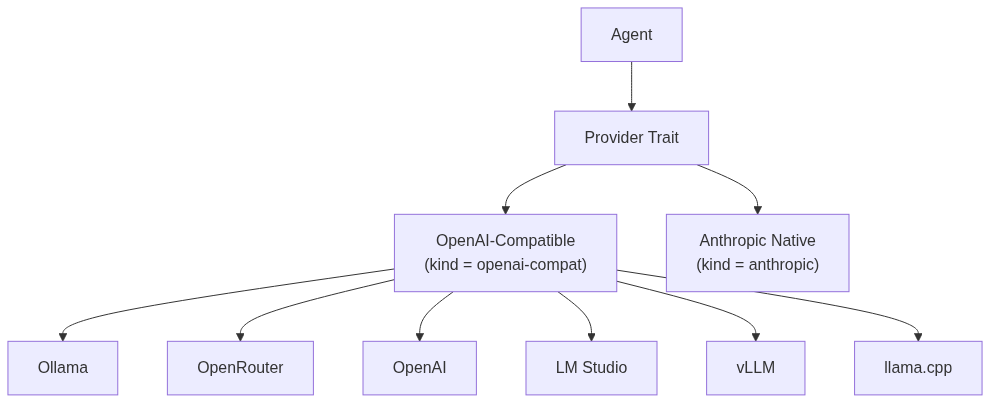
Two provider kinds are available. Ollama, OpenRouter, OpenAI, LM Studio, vLLM, and llama.cpp’s server all speak OpenAI’s /chat/completions shape, so one openai-compat implementation covers them all — you just point base_url at the right endpoint. The native Anthropic provider is its own thing because it speaks the Messages API directly and does its own OpenAI-shape ↔ Anthropic-shape translation for tools, tool results, and system prompt handling.
Caching adds a wrinkle here: native Anthropic supports prompt caching directly, but oli also supports Anthropic-style cache breakpoints in the openai-compat path for Claude models routed through OpenRouter. So “native provider” and “cached prefix” are related, but not identical ideas.
The openai-compat provider still has to handle backend quirks. OpenRouter sometimes returns 200 OK with an error object in the body. The provider layer normalizes this.
The payoff: switching backends is a config flip, not a code change.
The Extension Surface
A harness is only useful if you can make it yours. oli has three extension axes:
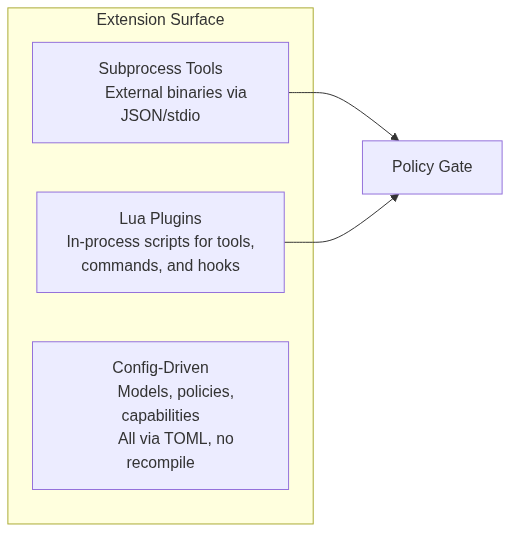
All extensions route through the policy gate. No escape hatches.
What I Left Out
To keep this post focused on the load-bearing components, I skipped several surfaces that ship in oli today: an MCP client (stdio + HTTP transports, with live tools/list_changed deltas), a hook dispatcher (PreToolUse / PostToolUse / Stop), session persistence as JSONL transcripts (with --resume / --continue), and the slash-command layer (/compact, /provider, /model, /sessions, etc.). Each is its own subsystem with its own trade-offs — let me know if you want any of them as a follow-up.
What This Means
The harness is invisible until it breaks. When Claude Code feels brilliant, you credit the model. When it feels broken — losing context, blocking the wrong thing, looping on a fix — that’s almost always the harness. The orchestration layer is doing the heavy lifting either way; you only notice when it fails.
The hard problems are systems problems. Memory management, policy enforcement, tool design, provider abstraction, local-model survival. Engineering challenges, not prompt engineering.
Knowing the machinery makes you a better user. Context overflow, policy gates, compaction, capability mismatches — once you can name what’s happening, you can debug it. Or work around it.
The repo is at github.com/sudoish/oli. It’s a learning artifact, not a production system. The code is there, the specs are documented, and the tests cover the edge cases if you want to dig in.